


Orion: A Unified Visual Agent for Multimodal Perception, Advanced Visual Reasoning and Execution | Summary
18 Nov 2025 | Paper Review Tool Use Agent Planning Vision-Language ModelsContents
This article explains the key points of Orion: A Unified Visual Agent for Multimodal Perception, Advanced Visual Reasoning and Execution.
- 2025-11-18 (arXiv)
- Reddy, N Dinesh, Snyder, Dylan, Kiragu, Lona, Mohin, Mirajul, Amin, Shahrear Bin, Pillai, Sudeep.
- VLM Run Research
- Paper
- Project Page
Summary
- Orion addresses visual workflows that require a model to locate, transform, and generate visual content through multiple executable steps. In the paper’s stated double-blind human evaluation, which conceals model identities when presenting outputs, Orion receives an overall score of 9.2/10 across 46 visual tasks, compared with 6.6 for ChatGPT (GPT-5), 6.4 for Gemini 2.5 Pro, and 5.7 for Claude Sonnet 4.5.
- The system combines a large language model (LLM), a model that processes and generates language, with specialized visual tools and a vision-language model (VLM), which reasons over visual content and language. Its Plan-Execute-Reflect loop plans tool sequences, executes operations, and checks intermediate results before retrying or refining them; the contribution concerns system architecture, with no new training procedure described.
- Standard benchmark results are mixed: Orion scores 69.7 on HallusionBench, listed as an evaluation of hallucination, or responses unsupported by visual content, against 53.6–55.9 for the reported baselines, but scores 33.3 on MMLongBench-Doc, a long-document benchmark, against 38.3–48.1. Unspecified model configurations, absent component ablations that test individual design choices, and missing uncertainty and cost measurements limit reproducibility and attribution of the reported gains.
1. Introduction
The introduction motivates a visual agent that executes operations on visual inputs. Orion combines natural-language task decomposition with specialized tools for object detection, which identifies and locates objects, segmentation, which delineates content at the pixel level, optical character recognition (OCR), which extracts text from visual inputs, and content generation across images, videos, documents, audio, and text.
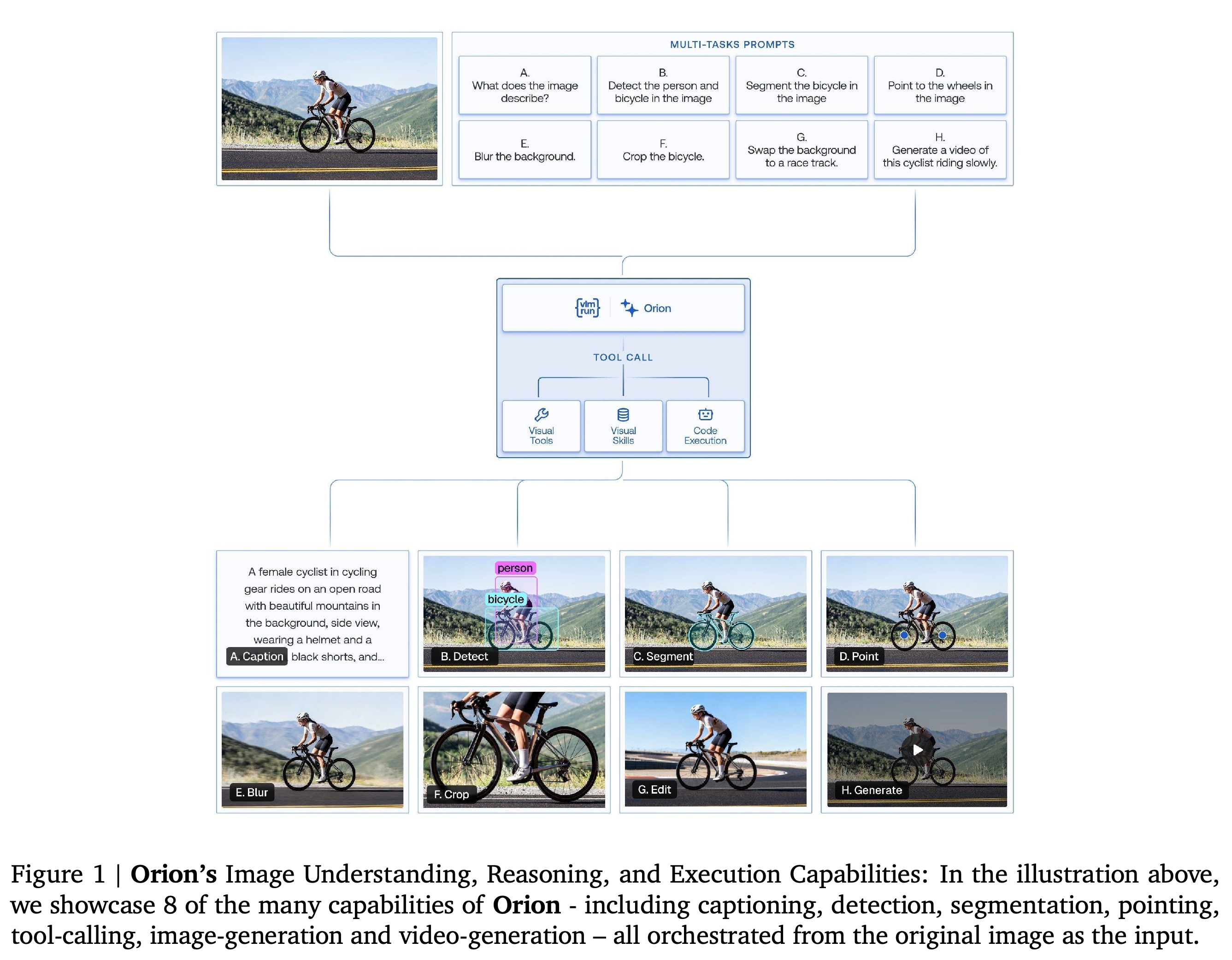
- Figure 1 illustrates eight outputs derived from a cyclist image: captioning, detection, segmentation, pointing, blurring, cropping, editing, and video generation.
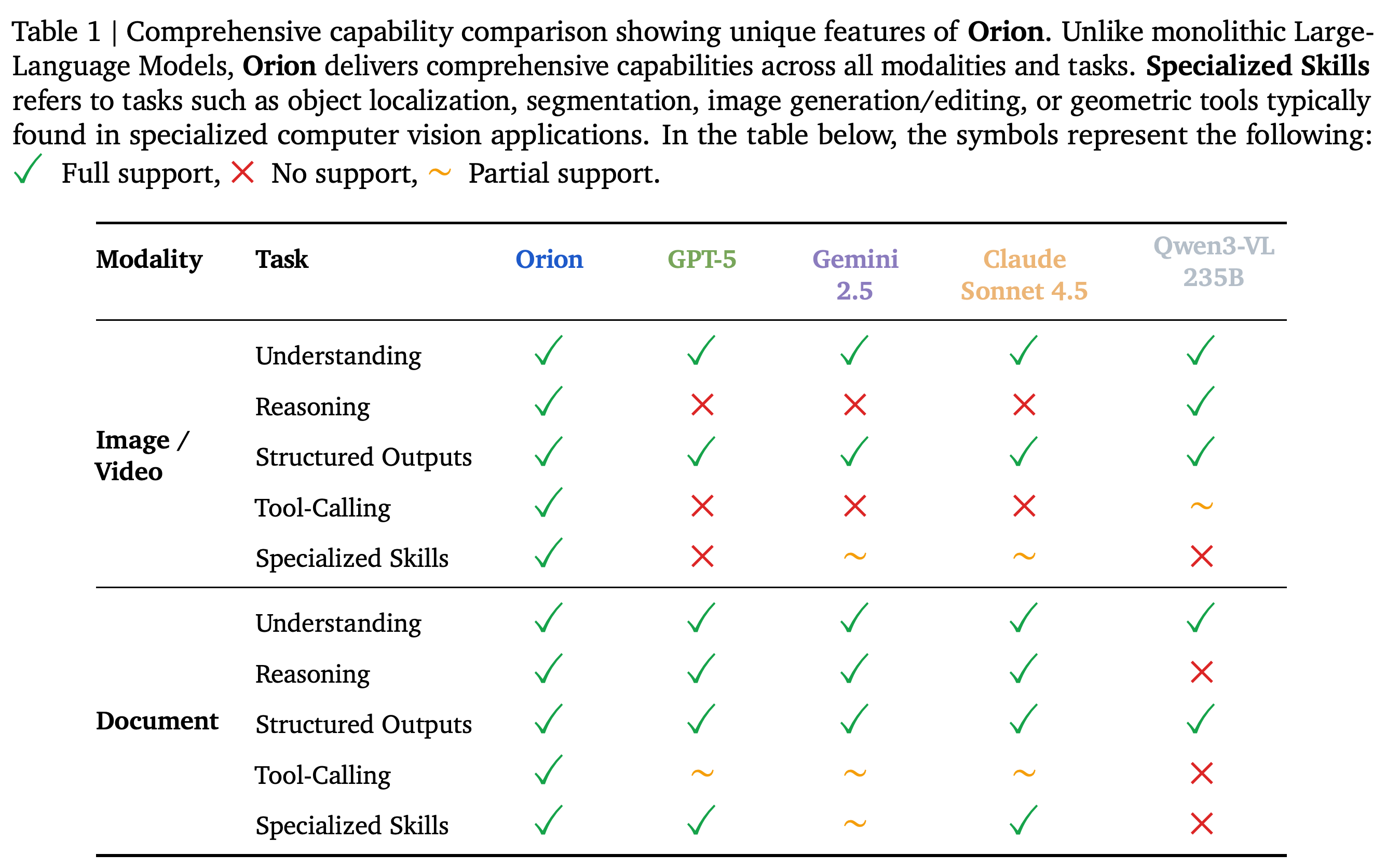
- Table 1 presents the authors’ categorical capability comparison with GPT-5, Gemini 2.5, Claude Sonnet 4.5, and Qwen3-VL 235B. Its support labels are qualitative assertions rather than measured task scores.
- The introduction claims broad superiority, but the later benchmark table contains several tasks on which Orion trails the comparison models.
Eight requests share one cyclist image and produce descriptions, spatial annotations, transformations, and generated content. The illustration shows input reuse across distinct operations without measuring accuracy or workflow success.
The authors mark Orion as fully supporting every listed image/video and document capability. The categorical labels lack an operational scoring protocol, so they provide a claimed feature inventory rather than quantitative comparative evidence.
2. System Overview
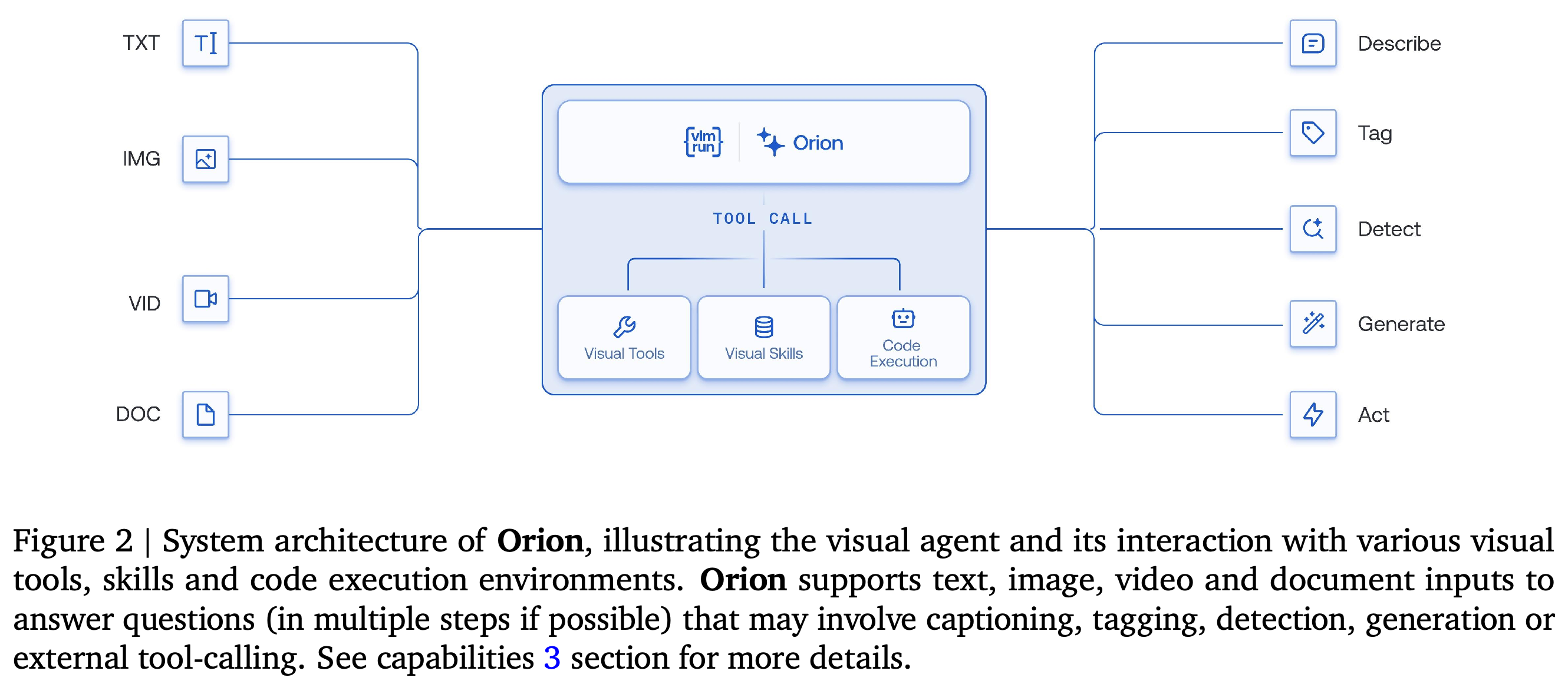
The system overview describes an orchestration framework that coordinates multimodal inputs, meaning inputs in different data formats, with visual tools, reusable skills, and execution environments. It covers the controller architecture, routing and validation features, developer interfaces, and planned extensions.
2.1. System Architecture
2.1.1. Unified Orchestration with Planning, Execution and Reflection describes a ReAct-style controller, which interleaves reasoning and acting, organized around Plan-Execute-Reflect. The planner determines tool order and dependencies, the execution engine runs operations sequentially or in parallel as dependencies permit, and the verifier checks outputs before retrying, refining, or completing the task.
- 2.1.2. Multi-Modal Tool Execution groups tools into image, document, video, and mixed-modality categories. Standardized input/output interfaces allow one tool’s results to become another tool’s inputs.
- Image tools cover detection, face recognition for identity verification, segmentation, and visual question answering, which answers questions about images. Document tools cover OCR, layout analysis, tables, forms, and keyword search.
- Video tools cover captioning, scene-boundary detection, object tracking across frames, and action recognition for activity classification. Mixed-modality tools cover retrieval across data formats, redaction that masks selected content, and region-level extraction.
- 2.1.3. Multi-Modal Context and Session Management selectively retrieves context relevant to the current instruction. The paper states that this supports conversations extending beyond 25 turns, without reporting a dedicated context-management experiment.
- 2.1.4. Reflection with Visual Judges uses VLM-as-a-Judge models, which assess visual tool outputs, at conditional checkpoints to check structural and semantic requirements. No ablation isolates the effect of these checkpoints.
Text, image, video, and document inputs converge on an agent connected to visual tools, skills, and code execution. The diagram identifies the components being coordinated; the accompanying text describes planning and verification.
2.2. Key System Features
Orion supports mixed input modalities within one conversation, dynamically routes difficult tasks to stronger models or specialized tools, and provides fallbacks when preferred resources are unavailable. Its chat mode supports exploratory interaction at https://chat.vlm.run, while its application programming interface (API), which provides programmatic access, supports structured outputs validated against expected types and schemas, or definitions of required data structure; reflection checks intermediate and final results.
2.3. Key API Features
The API accepts multimodal content through uploaded file identifiers or direct URLs and supports streaming, which delivers responses incrementally as they are generated. The paper also describes OpenAI-compatible chat completions and structured outputs validated against predefined schemas, with documentation at https://docs.vlm.run/agents/introduction.
- The VLMRun example uses https://agent.vlm.run/v1, uploads logo.jpg and racing.mp4, and calls client.agent.completions.create with model=”vlmrun-orion-1:auto”.
- The OpenAI client example uses https://agent.vlm.run/v1/openai and client.chat.completions.create. The text specifies stream=True for streaming.
- The structured-output example defines ImageCaption with caption: str and tags: list[str], passes {“type”: “json_schema”, “schema”: ImageCaption.model_json_schema()}, and validates the returned content with ImageCaption.model_validate_json(content). Here JSON is the structured data format used for the response; the snippets illustrate integration without reporting tests.
2.4. Extensions and Future Work
Planned extensions include external or user-defined tools, automatic generation and execution of custom computer-vision modules, and a hot-swappable underlying model architecture that allows model replacement. The paper presents these customization features as future work, although earlier diagrams already include tool calling and code execution.
3. Capabilities
The capabilities section catalogs image, document, and video workflows together with structured outputs. Its examples demonstrate output forms and combinations of tools, without providing accuracy estimates for each advertised capability.
3.1. Image Understanding, Reasoning and Tool-Use
Orion’s image capabilities span description, spatial analysis, text extraction, interface parsing, and image manipulation. Figures 3–11 illustrate these functions, including workflows that combine localization with downstream transformation or question answering.
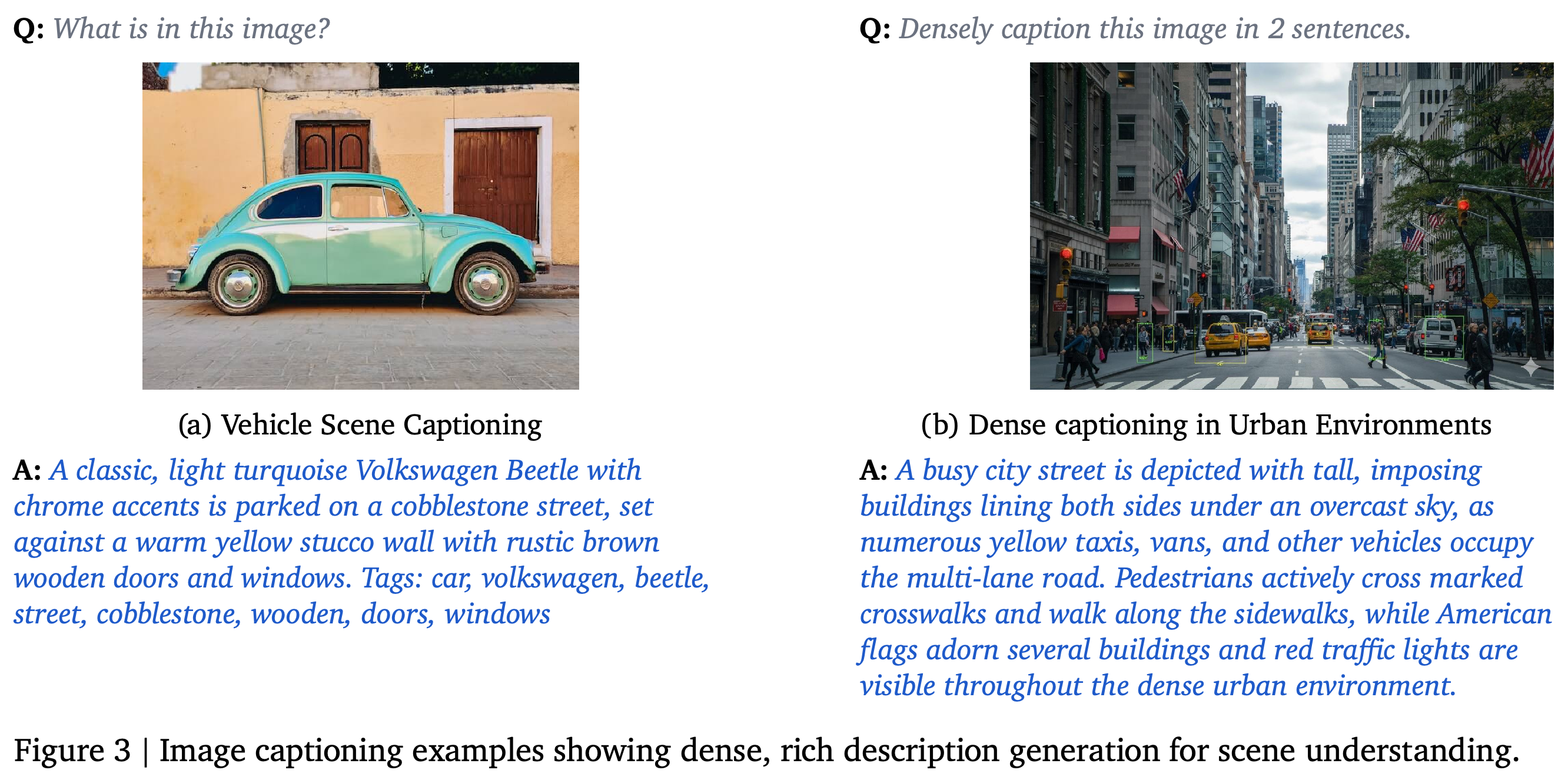
- 3.1.1. Image Captioning produces scene descriptions, region-specific annotations, and semantic tags that label image content. Figure 3 shows a vehicle description and a dense urban-scene caption.
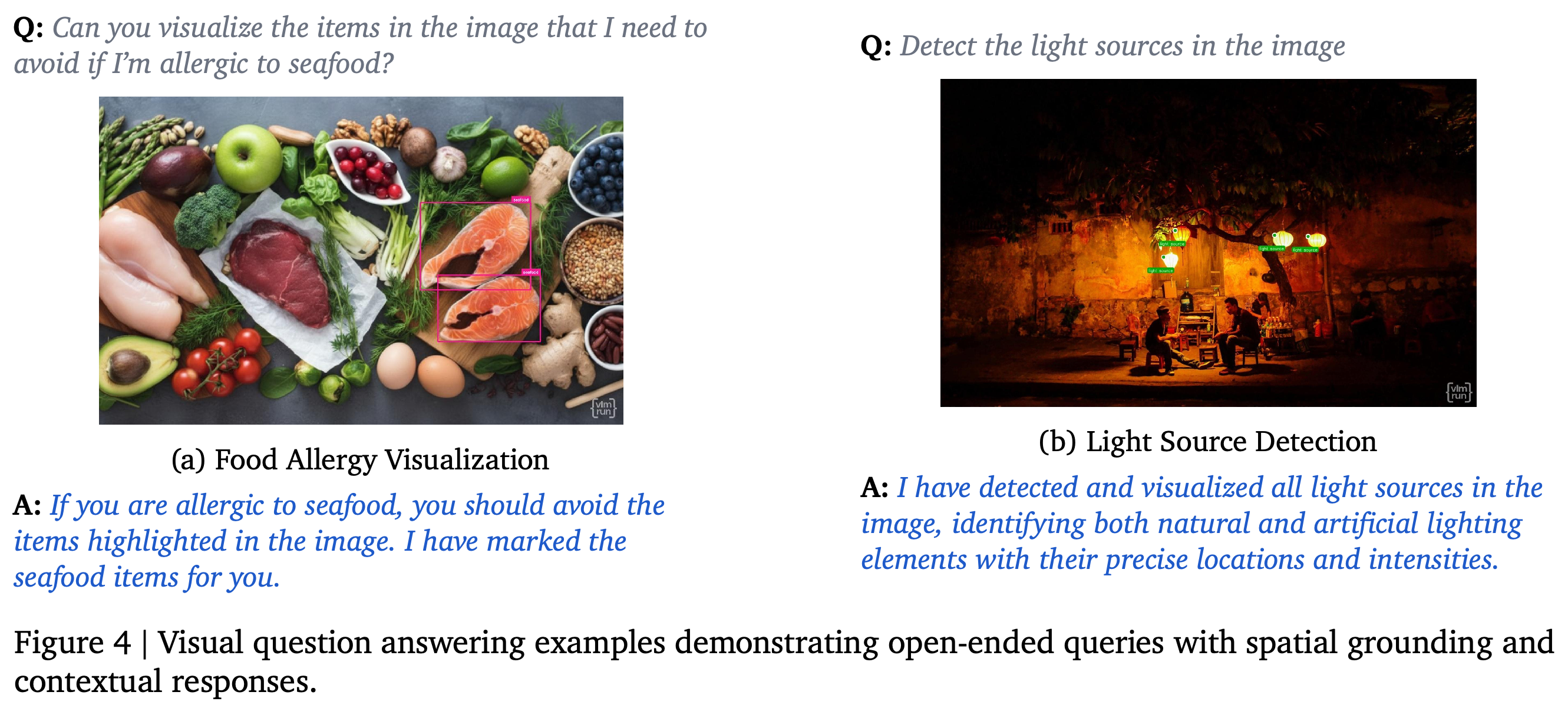
- 3.1.2. Visual Question Answering (VQA) with Grounding links answers to supporting image regions. Figure 4 marks seafood items and light sources in response to natural-language requests.
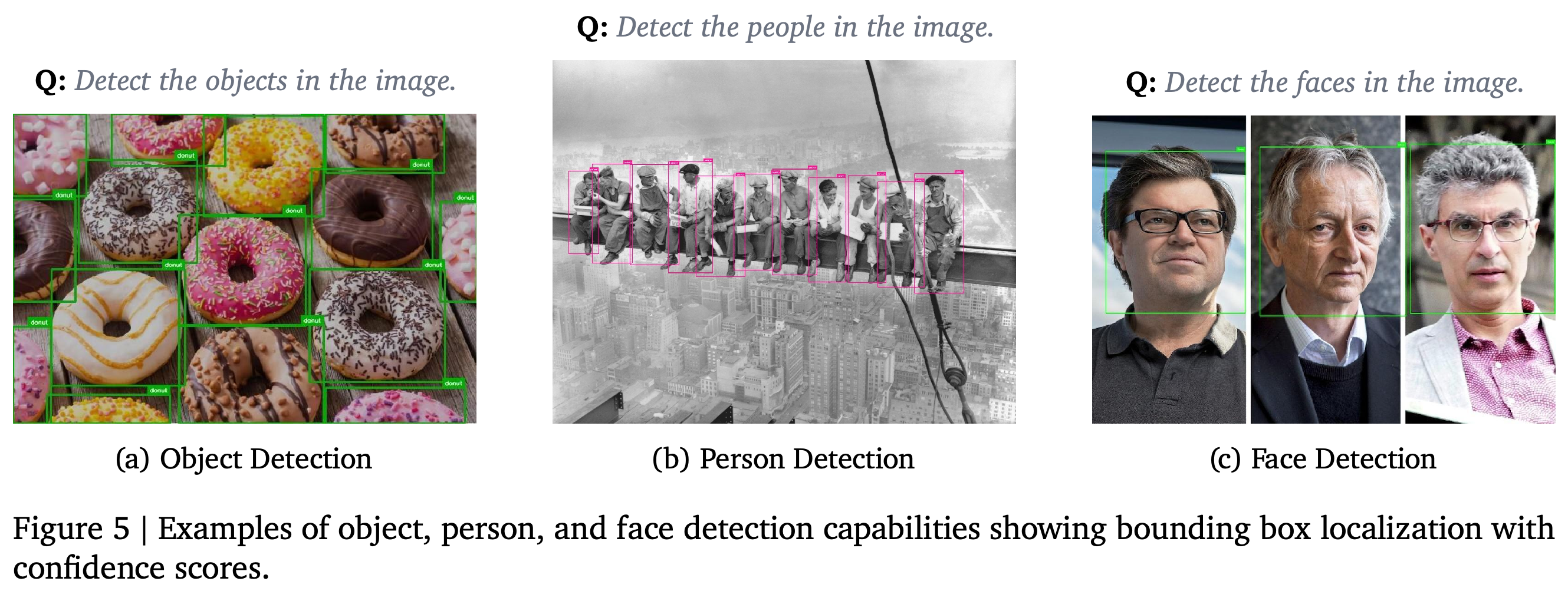
- 3.1.3. Object, Person, and Face Detection returns class labels, confidence scores, and normalized xywh bounding boxes, which encode horizontal and vertical position, width, and height relative to image dimensions. Figure 5 shows boxes for objects, people, and faces.
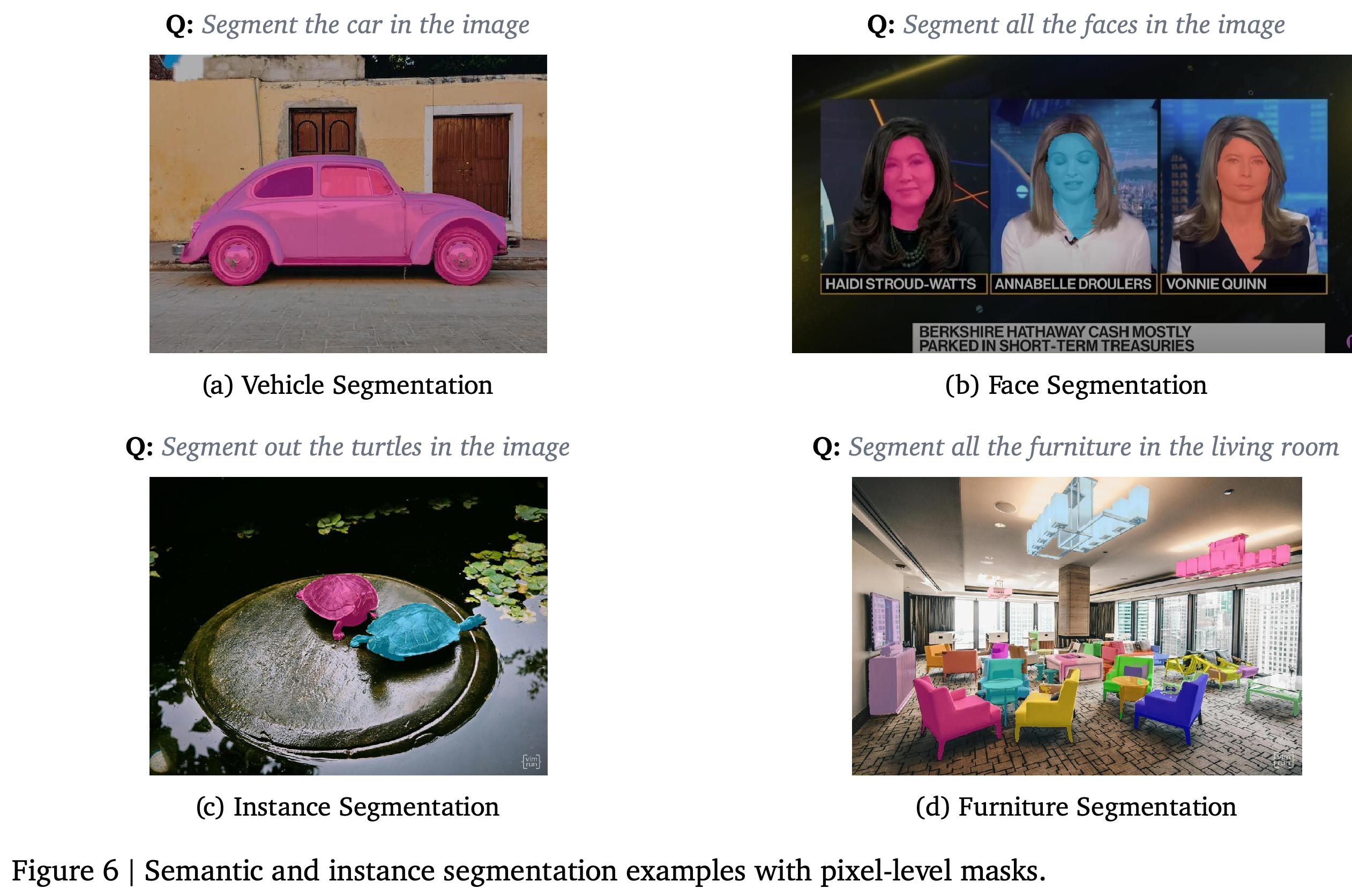
- 3.1.4. Image Segmentation supports semantic segmentation, which classifies scene pixels, and instance segmentation, which delineates individual objects. Masks are input-sized uint8 images, using unsigned 8-bit integer values, with unique labels (0, 1, 2, ..); Figure 6 illustrates vehicles, faces, turtles, and furniture.
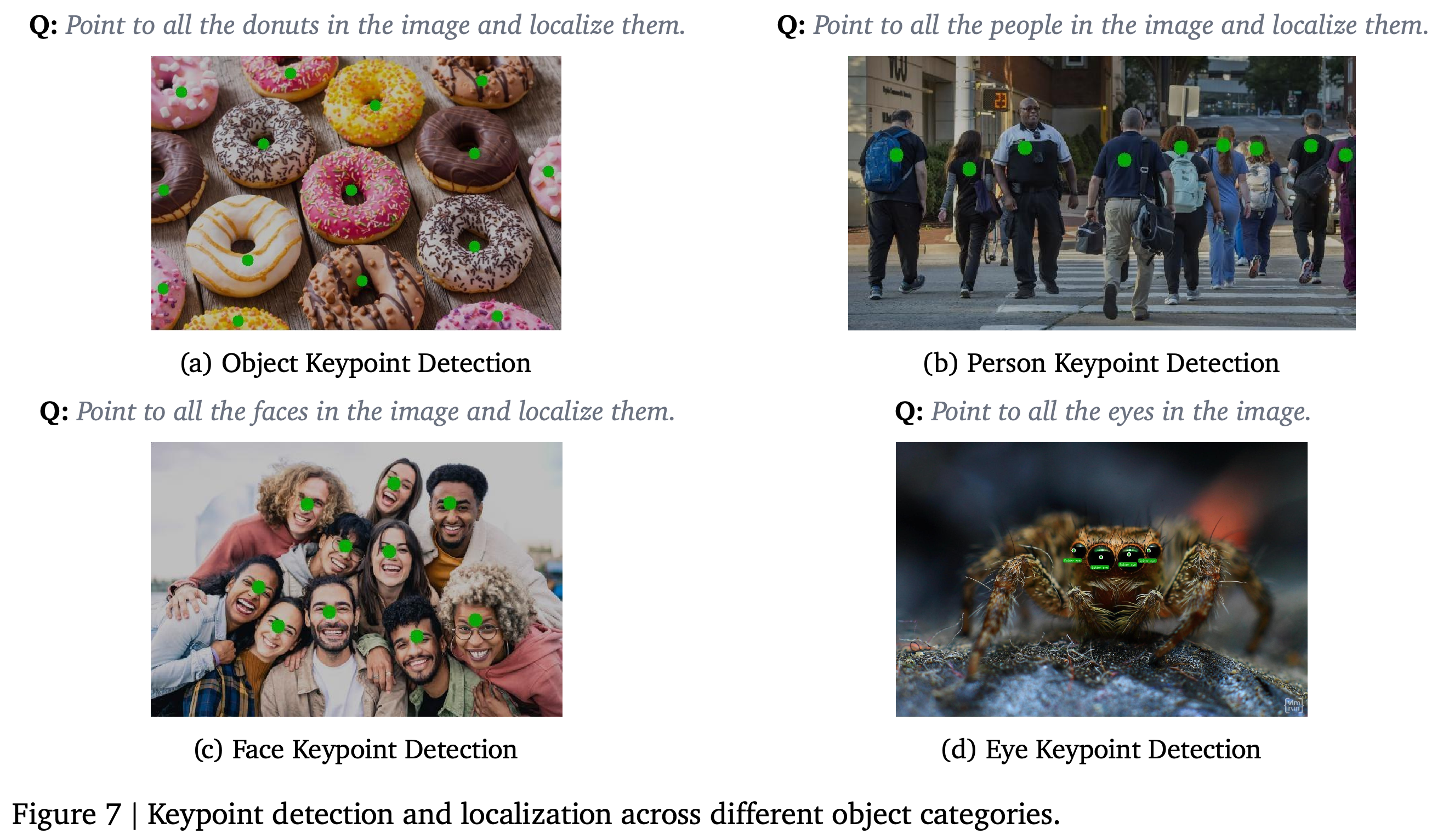
- 3.1.5. Spatial Localization and Pointing returns normalized xy keypoints, or two-dimensional point locations, for counting, classification, saliency detection that identifies visually prominent content, and spatial reasoning. Figure 7 shows points on donuts, people, faces, and eyes.
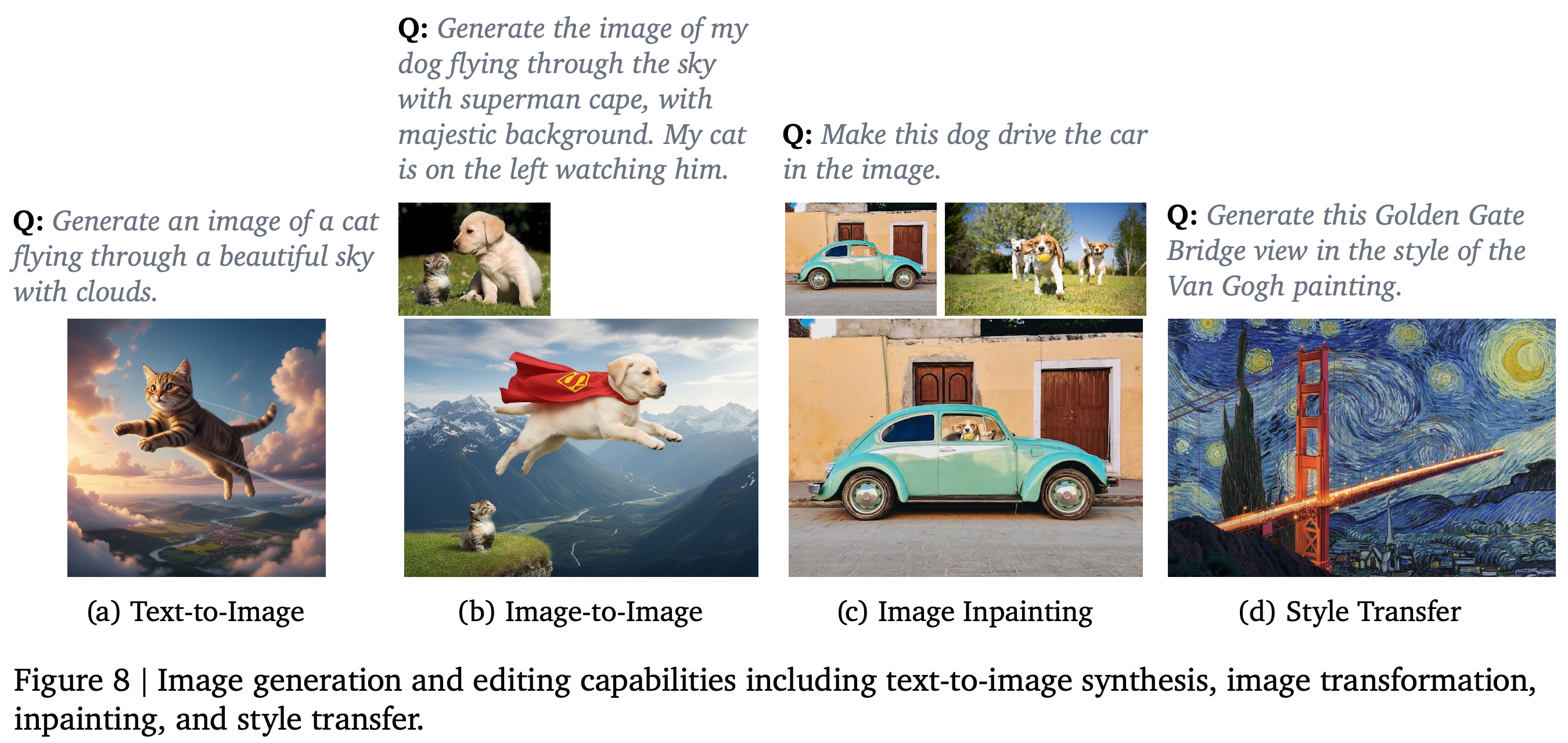
- 3.1.6. Image Generation and Editing includes text-to-image generation, reference-based editing, inpainting that replaces specified regions, and style transfer that changes visual style while preserving content structure. Figure 8 illustrates all four; the text also permits multiple reference inputs or outputs from previous tools.
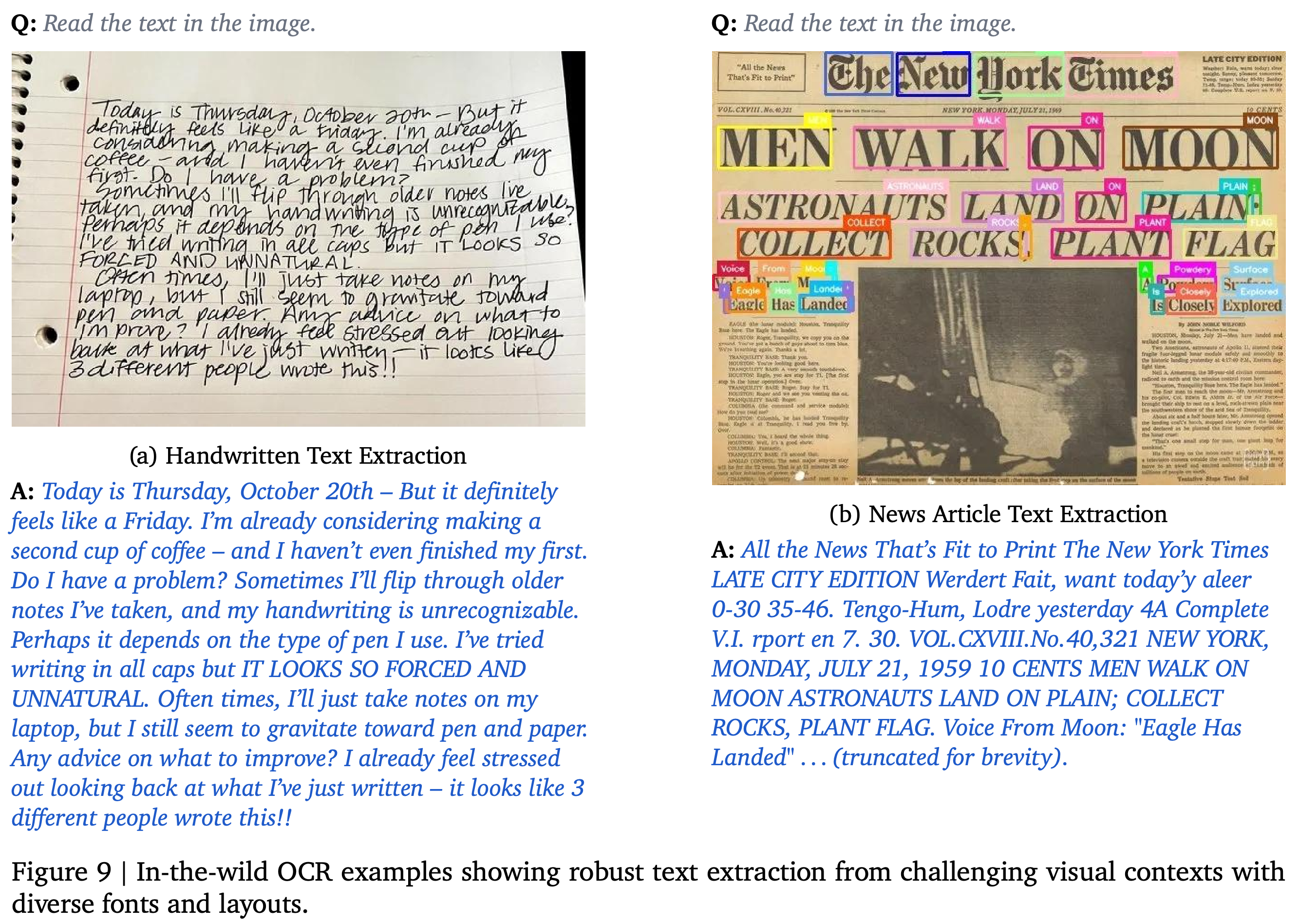
- 3.1.7. Image OCR returns extracted text, bounding boxes, and word-level confidence scores. Figure 9 includes handwriting and newspaper examples, but its newspaper transcription contains errors, including JULY 21, 1959 for an image showing JULY 21, 1969.
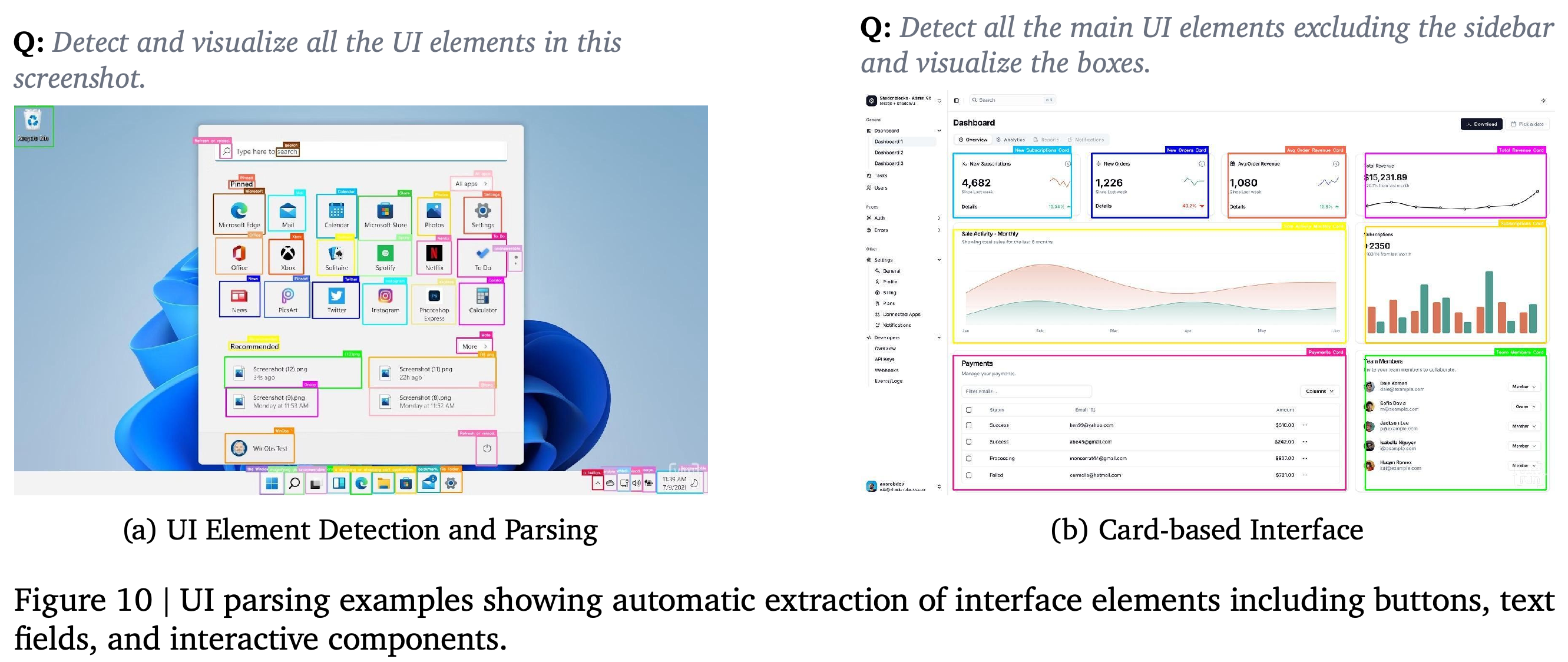
- 3.1.8. UI Parsing extracts user interface (UI) elements such as buttons, fields, links, and icons with normalized xywh boxes. Figure 10 shows a desktop interface and a dashboard request that excludes the sidebar.
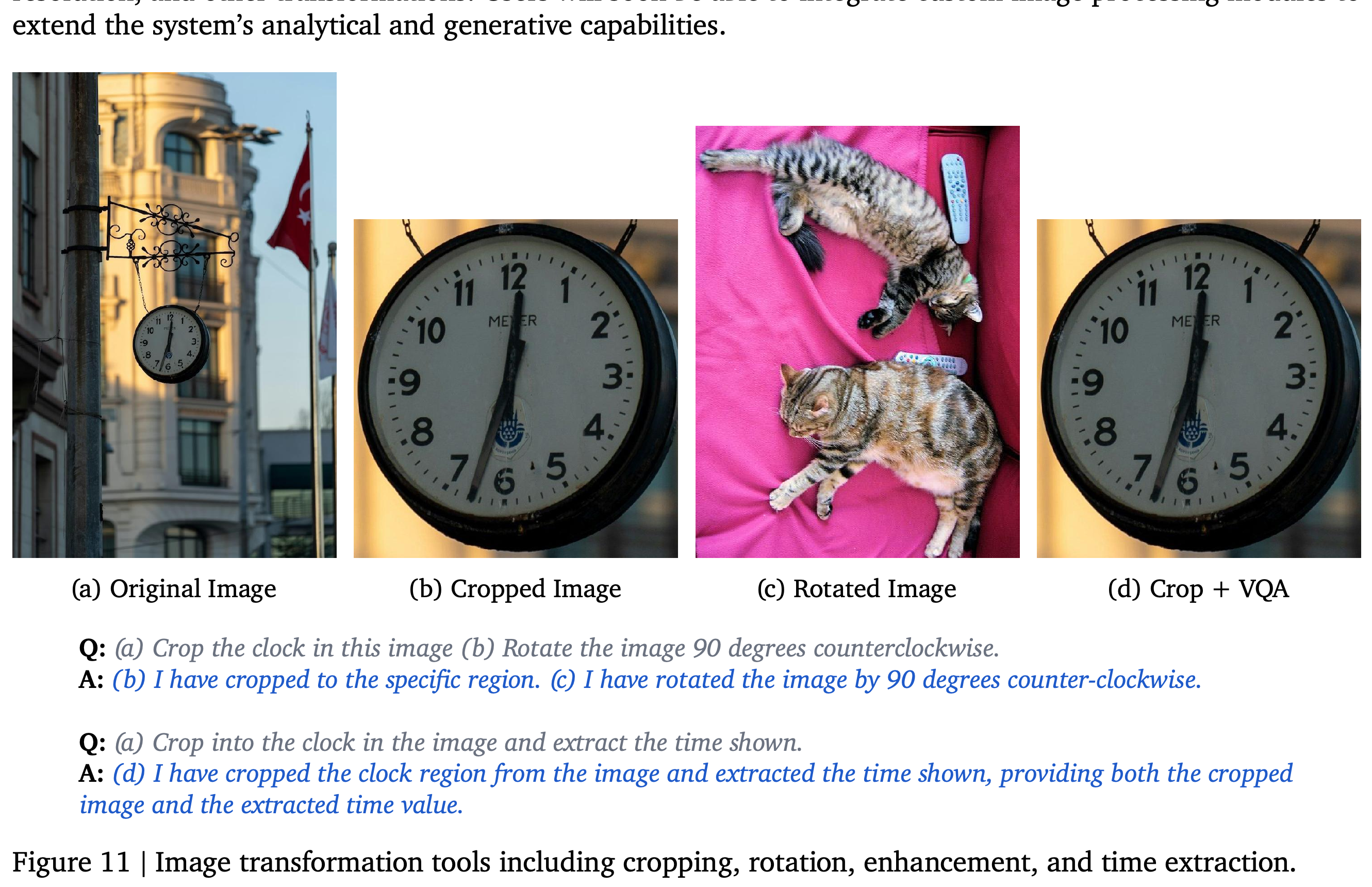
- 3.1.9. Image Tools includes cropping, rotation, blurring, and super-resolution, which increases image resolution. Figure 11 shows cropping, a 90 degrees counterclockwise rotation, and a crop followed by VQA to read a clock; custom image-processing modules are described as forthcoming.
The vehicle example combines a description with tags, while the street example follows a two-sentence caption request. These show different levels of descriptive detail and output formatting without a measured caption-quality comparison.
The outputs associate natural-language requests with marked seafood regions and light sources. They illustrate spatial grounding without establishing exhaustive detection or application-specific reliability.
Boxes localize donuts, people, and faces in different scenes. The examples demonstrate localization outputs without reporting how often detections are correct or how many objects are missed.
Colored masks delineate selected objects and distinguish instances, including two turtles and multiple furniture items. The masks show object regions at finer spatial detail than bounding boxes.
Point annotations identify locations on objects, people, faces, and eyes. They illustrate the keypoint interface used for counting and queries about small visual features.
The examples use text alone, a reference image, multiple references for an edit, and a requested artistic style. They demonstrate generation modes without identifying the underlying generators or measuring preservation of reference content.
Handwriting and a newspaper are paired with extracted text, and the newspaper includes localized words. The displayed transcription contains visible errors, including a mismatched year, which qualifies the caption’s claim of robust extraction.
Boxes annotate desktop controls and dashboard components, with the latter request excluding the sidebar. This shows instruction-conditioned interface localization without demonstrating interaction or automated testing success.
A clock crop provides a focused input for subsequent question answering, while a separate example demonstrates image rotation. The displayed response asserts time extraction but does not show a concrete extracted time value.
3.2. Document Understanding, Reasoning and Tool-Use
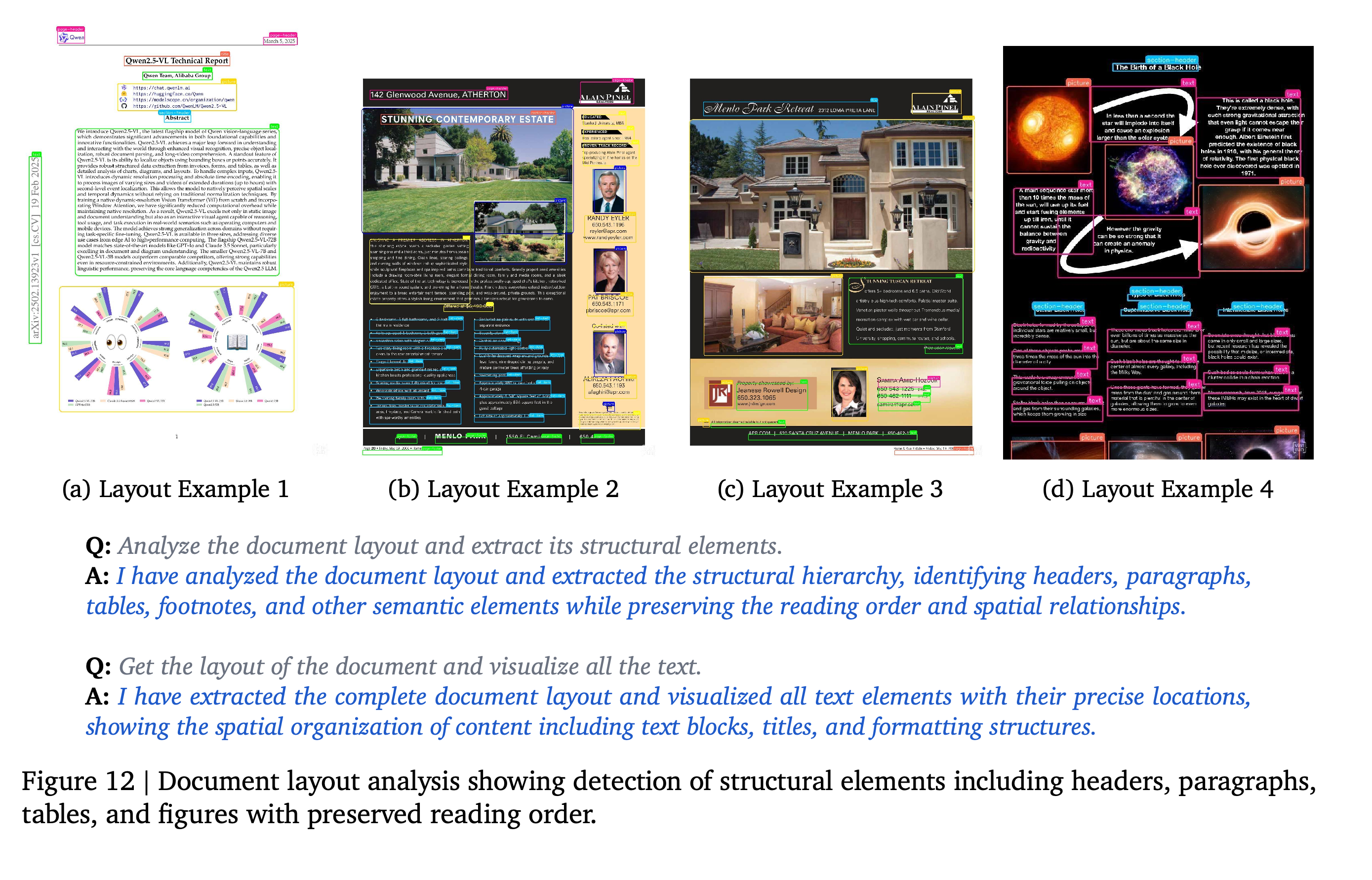
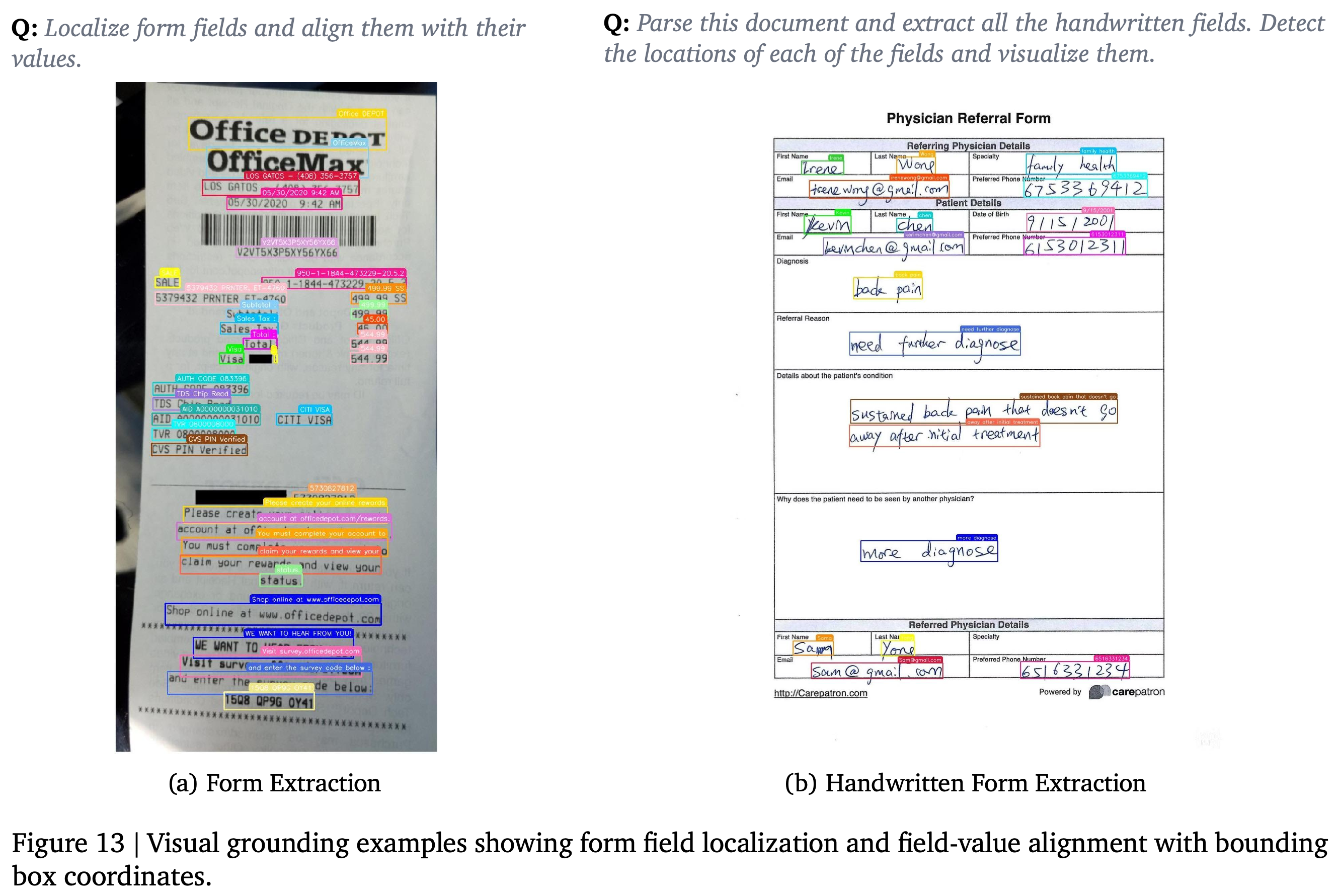
Document workflows combine layout analysis, OCR, field extraction, selective page retrieval, and editing for scanned and digital documents. Figures 12 and 13 illustrate structural localization and printed or handwritten field extraction.
- 3.2.1. Document Layout Understanding identifies paragraphs, headers, tables, footnotes, and other elements while preserving reading order and spatial relationships. Localization uses normalized xywh boxes.
- 3.2.2. Document OCR supports printed and handwritten content, structured forms, and tables. Form OCR associates localized fields with values and includes checkboxes, signatures, multi-page analysis, and cross-page field tracking.
- 3.2.3. Document Tools retrieves relevant pages from documents of 100+ pages without loading entire files into memory and supports in-place editing or redaction. The paper reports no memory or runtime measurements for this document-size condition.
Four documents with different layouts receive structural and text-region annotations. The examples show localization across heterogeneous pages, while preservation of reading order is asserted without a quantitative check.
A receipt and a handwritten referral form receive localized field annotations. Extracted text retains spatial context for field-value alignment, but no extraction-accuracy measurements accompany the examples.
3.3. Video Understanding, Reasoning and Tool-Use
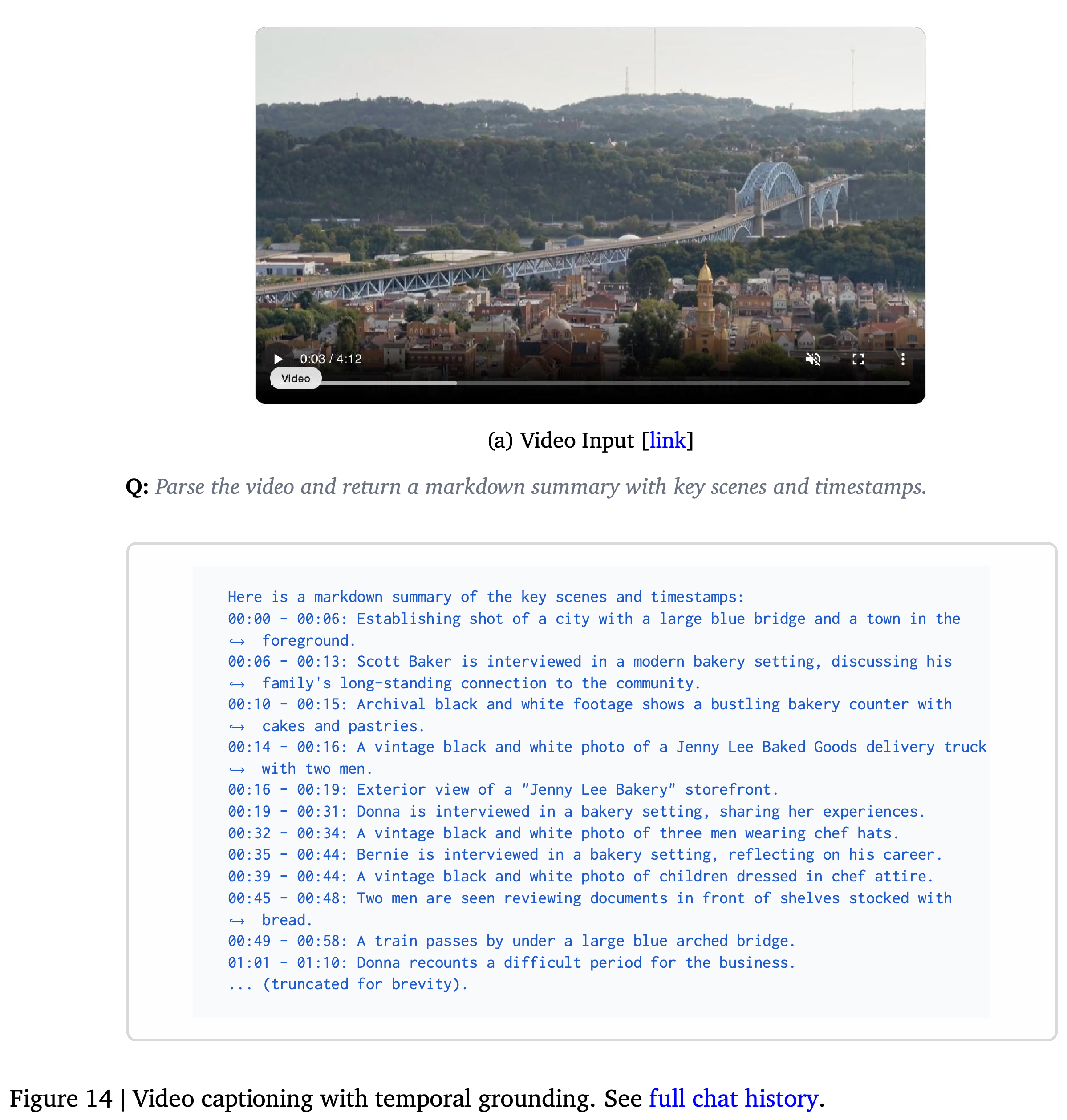
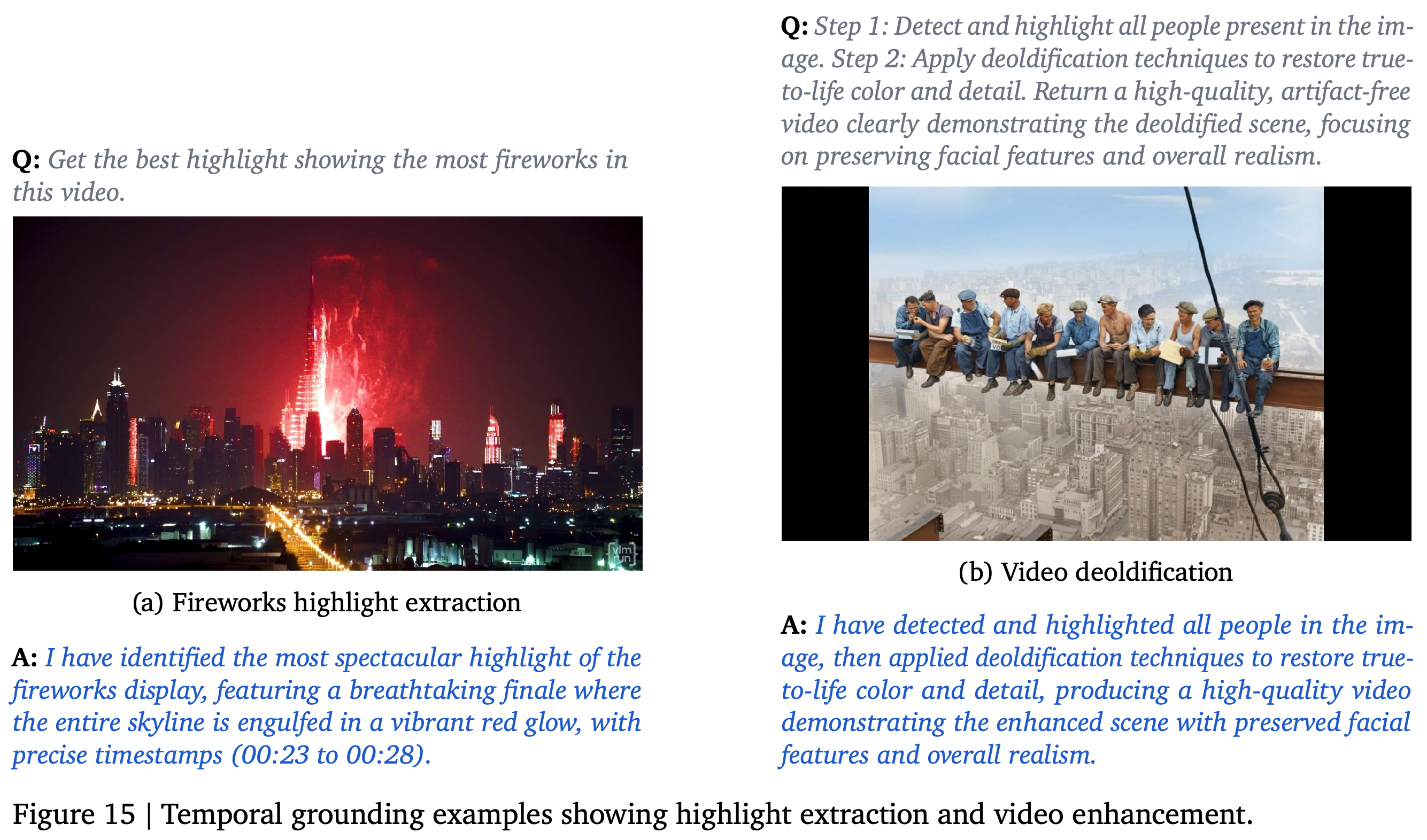
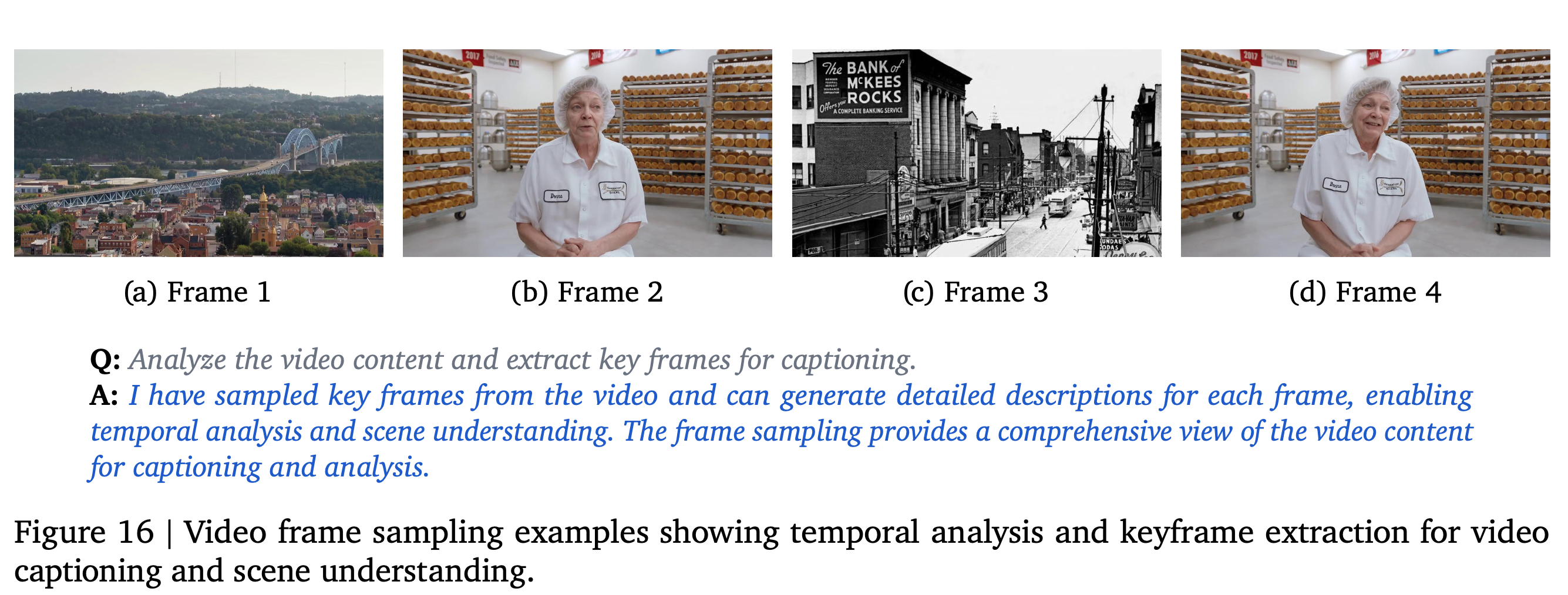
Video workflows combine timestamped descriptions, event localization, short-video generation, frame sampling, and clip extraction. Figures 14–16 illustrate a bakery-video summary, a fireworks highlight from 00:23 to 00:28, a color-restoration and animation example, and sampled frames.
- 3.3.1. Video Captioning produces whole-video or segment descriptions with timestamps and per-frame analysis. Figure 14 shows a Markdown scene summary, using a text formatting syntax, rather than a quantitative captioning evaluation.
- 3.3.2. Temporal Grounding locates described events using start and end timestamps in HH:MM:SS format, representing hours, minutes, and seconds, for subsequent sampling or trimming.
- 3.3.3. Video Generation creates short sequences from text prompts or reference images, including style transfer and scene animation.
- 3.3.4. Video Tools supports sampling at intervals or specific timestamps, highlight extraction with segment URLs, scene segmentation, and time-based trimming. The text states that custom video modules can be integrated and claims millisecond-level trimming accuracy without a measurement protocol.
The bakery-video output associates scene descriptions with time intervals for later retrieval or editing. Some displayed intervals overlap; no reference annotation is provided to assess their alignment.
One example selects a fireworks segment from 00:23 to 00:28; another combines person analysis with color restoration and video creation from an archival scene. The pair shows event selection and a workflow that combines analysis with generation.
The sampled frames expose distinct scenes for captioning and analysis. They show intermediate visual evidence available to the workflow without specifying sampling frequency or the quality of scene selection.
3.4. Structured Outputs
Structured outputs use explicit schemas for arrays, key-value objects, tagged regions, time segments, and entities so that intermediate results can be consumed programmatically. Multimedia results are returned through pre-signed URLs, which provide authorized access to output assets, and responses use Pydantic-compatible JSON, allowing validation through typed Python data models.
- A response can combine image crops, video clips, or generated documents, allowing results from different modalities to participate in one workflow.
- Schema validation checks output structure and types. The controller’s visual checks address whether the content meets the instruction’s semantic requirements.
4. Quantitative Evaluation
The evaluation combines established benchmarks with a human comparison of visual workflows across image, document, and video inputs. These comparisons use different baseline model variants and should be interpreted separately.
4.1. Benchmark Performance
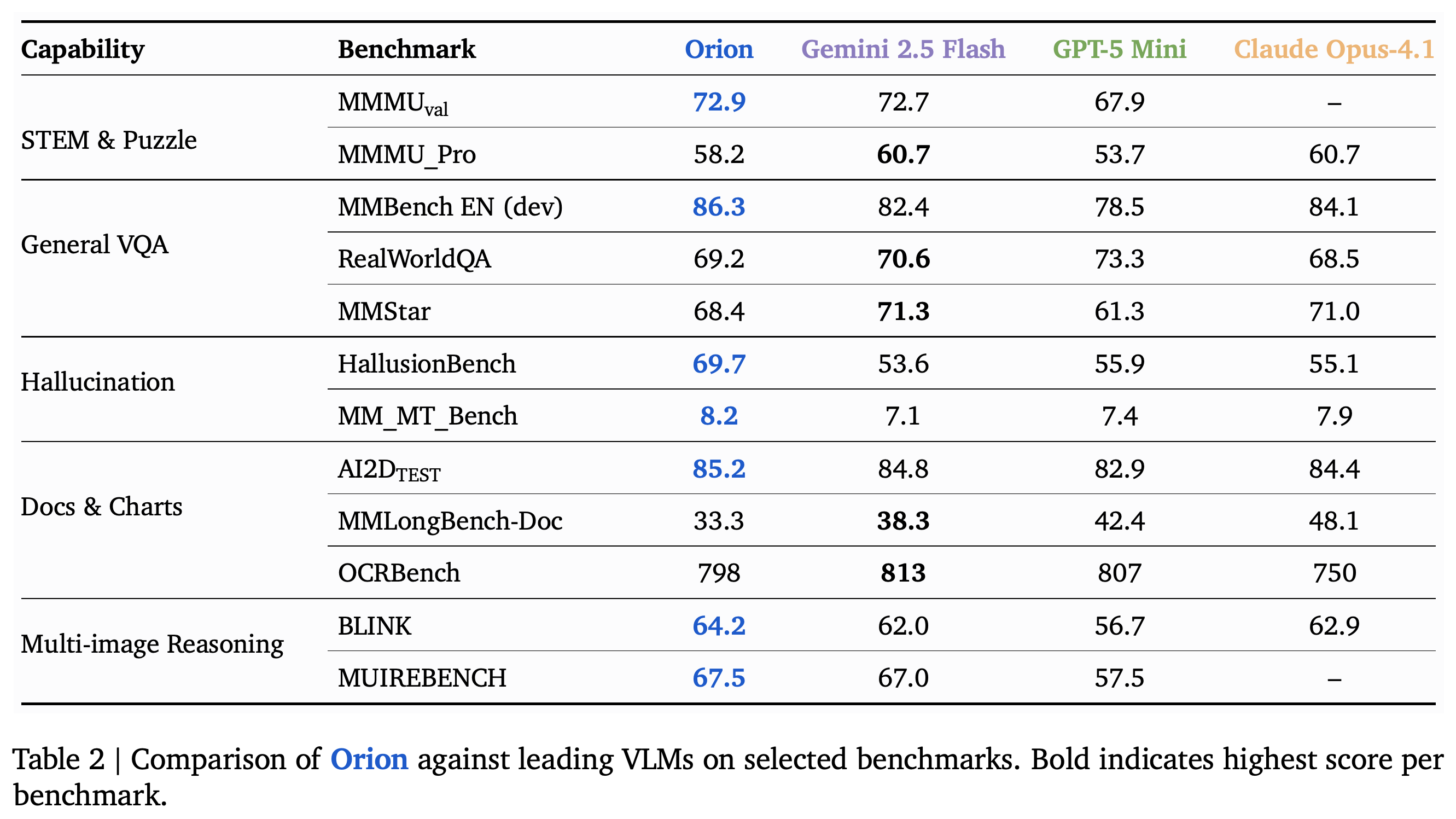
Table 2 compares Orion with Gemini 2.5 Flash, GPT-5 Mini, and Claude Opus-4.1 across 12 benchmark rows. Orion has the highest reported numerical score on seven rows and trails at least one baseline on the other five, with its largest numerical margin over the best baseline on HallusionBench.
- In the order Orion / Gemini 2.5 Flash / GPT-5 Mini / Claude Opus-4.1, scores are MMMU_val: 72.9 / 72.7 / 67.9 / unavailable and MMMU_Pro: 58.2 / 60.7 / 53.7 / 60.7. MMMU evaluates multidisciplinary multimodal understanding and reasoning.
- General VQA scores are MMBench EN (dev): 86.3 / 82.4 / 78.5 / 84.1; RealWorldQA: 69.2 / 70.6 / 73.3 / 68.5; and MMStar: 68.4 / 71.3 / 61.3 / 71.0. The paper groups these benchmarks under general image question answering.
- Rows grouped under Hallucination report HallusionBench: 69.7 / 53.6 / 55.9 / 55.1 and MM_MT_Bench: 8.2 / 7.1 / 7.4 / 7.9. The PDF does not further define the latter benchmark or its scoring scale.
- Document and chart scores are AI2D_TEST: 85.2 / 84.8 / 82.9 / 84.4; MMLongBench-Doc: 33.3 / 38.3 / 42.4 / 48.1; and OCRBench: 798 / 813 / 807 / 750. The paper places these under document and chart capabilities without specifying each scoring protocol.
- Multi-image reasoning scores are BLINK: 64.2 / 62.0 / 56.7 / 62.9 and MUIREBENCH: 67.5 / 67.0 / 57.5 / unavailable. These are the two benchmarks listed for reasoning across multiple images.
- DocVQA, which evaluates question answering on document images, is mentioned in the evaluation narrative but has no numerical row in Table 2. The paper does not specify Orion’s underlying model configuration, benchmark prompts, inference budgets, or uncertainty estimates.
The numerical entries show Orion leading seven of 12 rows, including HallusionBench and MMBench EN (dev), while trailing on long-document understanding and several other tasks. Bold formatting does not consistently identify numerical maxima, so comparisons should follow the values.
4.2. Human Evaluation Methodology
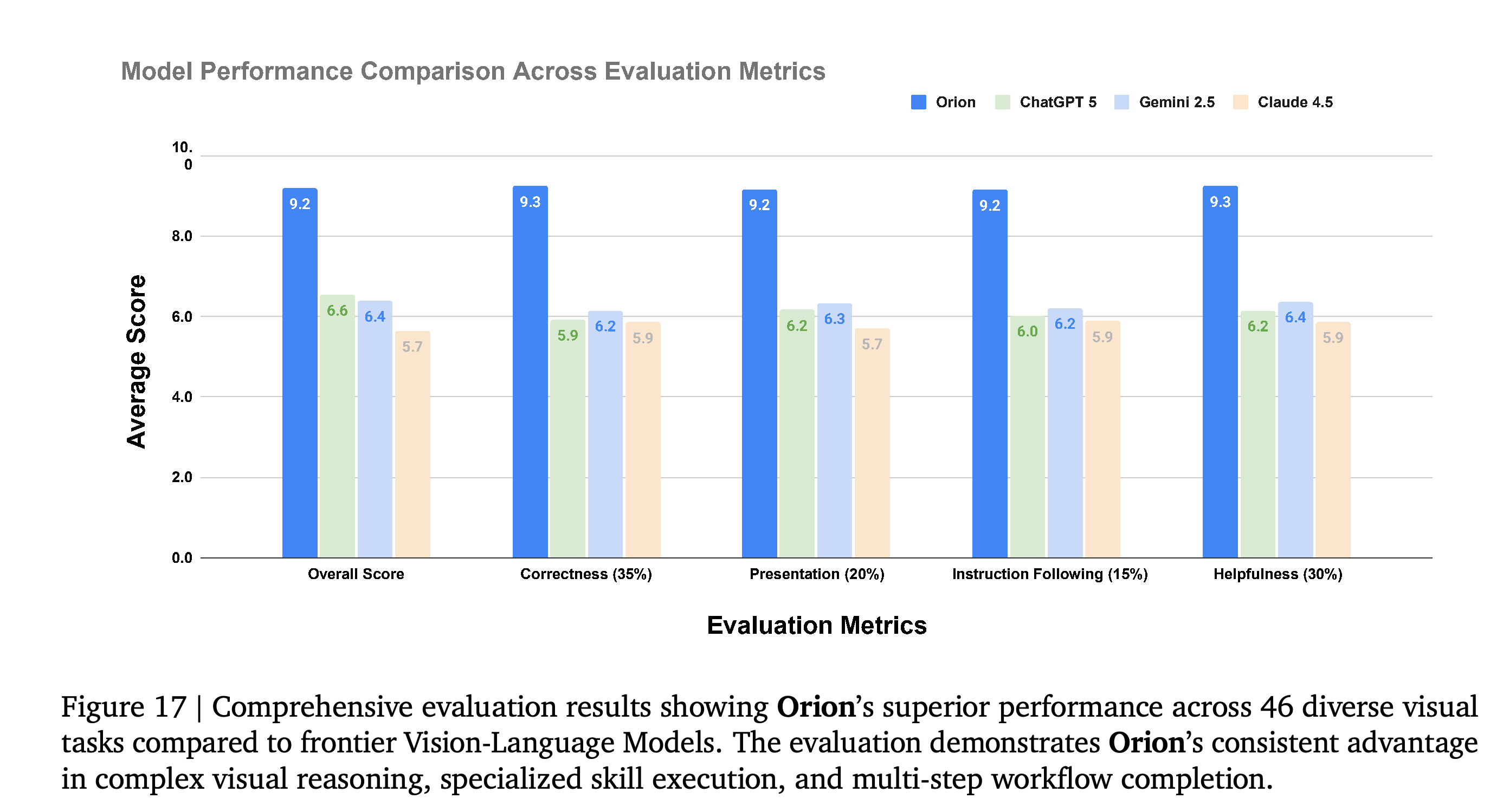
The human evaluation compares Orion, ChatGPT (GPT-5), Gemini 2.5 Pro, and Claude Sonnet 4.5 on 46 visual tasks using a stated double-blind protocol. Outputs are randomized and labeled Model A, B, C, or D; ten independent evaluators participate, with at least three calibrated evaluators assigned to each task.
- The 0–10 composite score weights Helpfulness at 30%, measuring coverage of requested requirements; Correctness at 35%, measuring factual correctness; Presentation at 20%, measuring visual presentation and rendering artifacts for visual outputs; and Instruction Following at 15%, measuring compliance with constraints. Evaluators receive each task’s input, prompt, and all four outputs.
- Figure 17 reports overall scores of 9.2 / 6.6 / 6.4 / 5.7 for Orion / ChatGPT / Gemini / Claude.
- In the same order, Correctness scores are 9.3 / 5.9 / 6.2 / 5.9; Presentation scores are 9.2 / 6.2 / 6.3 / 5.7; Instruction Following scores are 9.2 / 6.0 / 6.2 / 5.9; and Helpfulness scores are 9.3 / 6.2 / 6.4 / 5.9.
- The paper does not report agreement between evaluators, confidence intervals, task-level score distributions, or how Presentation is handled for outputs without visual artifacts. The displayed component averages do not consistently reproduce the overall scores using the stated weights; for example, ChatGPT’s components yield 6.065 rather than 6.6, leaving aggregation details unclear.
Orion’s displayed overall score is 9.2, compared with 6.6, 6.4, and 5.7 for the three human-evaluation baselines, and its component averages are also higher. The plot contains no uncertainty bars, and the displayed components do not consistently reconstruct the overall scores under the stated weights.
4.3. Performance Analysis and Comparison
The authors attribute improved visual accuracy and reduced hallucination to specialized tools and verification within executable workflows. HallusionBench and the human evaluation show advantages under their respective comparison conditions, while weaker results on MMLongBench-Doc, OCRBench, and several reasoning benchmarks qualify claims of uniformly superior performance.
- Figure 17 shows higher aggregate human ratings across all four dimensions. It does not establish a win on every individual task.
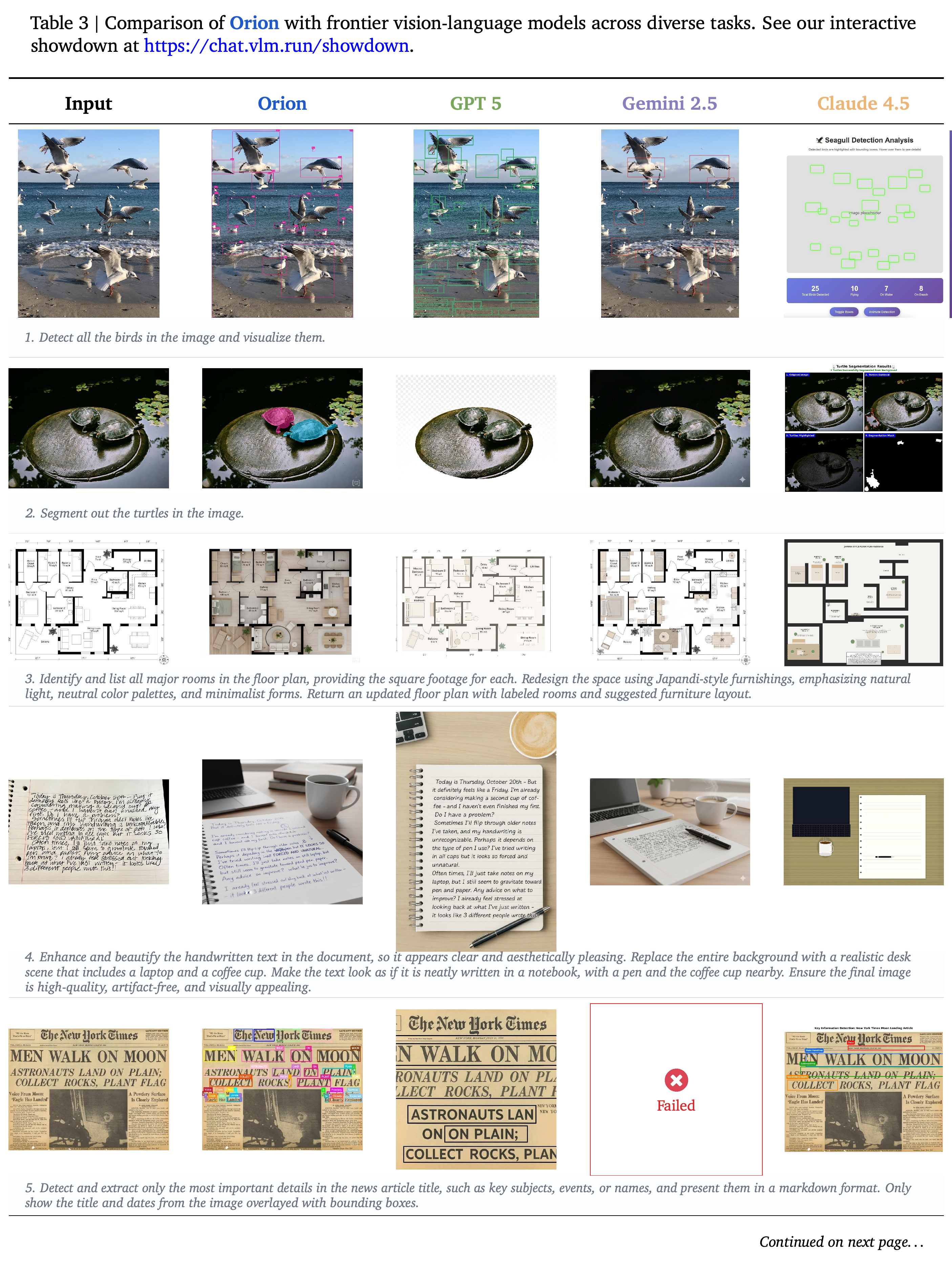
- Table 3 spans pages 22–27 and displays 28 numbered task comparisons covering localization, segmentation, document manipulation, image editing, and video workflows. It includes unsuccessful outputs, a medical-analysis refusal, and a response reporting a video-analysis timeout from comparison systems.
- These examples illustrate differences in delivered artifacts and task completion. Without documented comparable tool access, inference budgets, and component ablations, they do not isolate whether gains arise from planning, specialized tools, reflection, or underlying models.
- The interactive comparison is linked at https://chat.vlm.run/showdown. The PDF’s selected examples do not establish deployment reliability, clinical validity, or error rates for privacy redaction.
Across six pages, 28 numbered examples contrast delivered visual artifacts, text responses, failures, and a refusal. They illustrate differences in task completion and tool-enabled outputs without supplying task-level scores, comparable resource conditions, or reference validation for every result.
4.4. Future Work
Future evaluation work targets complex, multi-turn tasks whose outputs require visual validation against ground truth, or reference outputs used to assess correctness. Other directions include broader domain-specific tool integration, improved tool composition, fewer inference calls, faster execution, and stronger recovery from errors in long workflows.
5. Discussion and Future Work
The discussion frames Orion as an application of tool-augmented language-model reasoning to visual tasks. Its design combines model-based interpretation with specialized operations whose intermediate outputs can be inspected and validated.
5.1. Limitations and Challenges
The paper identifies suboptimal tool selection, declining success in workflows described as exceeding 30+ steps, and substantial computational cost as unresolved limitations. Error accumulation, difficulty maintaining state, limited backtracking, repeated planning and reflection calls, and parallel execution infrastructure contribute to these challenges.
- Proposed improvements include learning from historical tool choices, cost-aware selection, and domain-specific tool specialization.
- The paper gives no success-rate curve for the 30+ step condition and no latency, call-count, compute, or monetary-cost measurements.
5.2. Broader Impact
The authors argue that natural-language access to specialized tools can help non-experts prototype visual workflows and that execution traces can support auditing. They also identify privacy concerns around face recognition and tracking, surveillance or manipulation misuse, propagated bias, and the need for human oversight in sensitive applications; safeguards are discussed without a reported evaluation.
Contributors
The VLM Run Research team credits Dinesh Narapureddy and Sudeep Pillai with Orion’s development. Shahrear Bin Amin, Mirajul Mohin, and Dylan Snyder are acknowledged for frontend chat and backend system development, and Lona Kiragu for dataset evaluation and scoring.
Appendix
- The supplied 29-page PDF has no separately labeled appendix. Table 3’s extended comparison remains part of the main body, followed by discussion, contributors, and references.
Brief Thoughts
Orion offers an engineering pattern for visual workflows: plan tool dependencies, exchange structured intermediate results, and validate visual artifacts before continuing. The reported human ratings and HallusionBench scores support further evaluation of this pattern, but unspecified configurations, absent ablations, and missing cost measurements prevent a reproducible assessment of component benefits and deployment trade-offs.